
The TextboxEditMask Behavior


ehaviors, which implement a mechanism for wrapping control functionality into reusable blocks, were introduced in Expression Blend 3. They're not a new concept; packaging control event handlers in a separate, reusable class has been possible since .Net was first introduced. What is new is the seamless integration with a Visual Designer (in this case, Expression Blend). Behaviors enable a truly great design-time experience when applying custom functionality to UI controls. Something that, until now, has required an unwieldy amount of custom code.

The TextboxEditMask behavior, as you might guess from the name, adds edit mask functionality to a textbox. It comes in both Silverlight and a WPF flavors. You can:

  • Download the source code as a Visual Studio 2008 project and compile it yourself, or
  • You can just Trust the Monk with the pre-compiled DLLs.

Behaviors: the Quick Run Down

This isn't a tutorial on behaviors, so I won't delve too deeply into the details of their usage, but at the time of this writing they really are a relatively new feature on the Expression Blend landscape, so a quick step through of their use is in order:
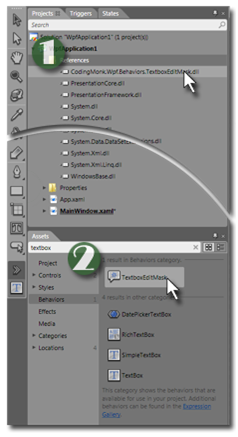
Step one: Reference the DLL. For this article, choose either:

  • CodingMonk.Wpf.Behaviors.TextboxEditMask.dll
  • CodingMonk.Silverlight.Behaviors.TextboxEditMask.dll

depending on your project type.


Step two: Drag the behavior from your "Assets" pane and drop it on to a control (in this case, a TextBox control). This creates an instance of the behavior and applies it to the control.


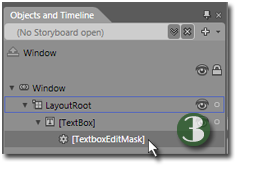
Finally: Select the behavior you've just applied from the "Objects and Timeline" pane:


Properties of the TextboxEditMask

After selecting an instance of the TextboxEditMask behavior, three custom properties will show in the "Properties" pane:
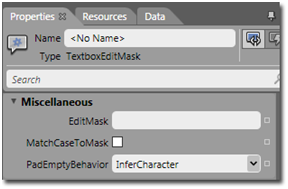
The first, EditMask, holds the pattern to be enforced. This mask should conform to the CodingMonk Edit Mask notation (version 1.1). The notation is relatively easy to learn, especially if you've had experience with more exhaustive notations such as Regular Expressions.

The second parameter, MatchCaseToMask, is a checkbox. This is off by default, rendering the edit mask case-insensitive. This means when a letter appears in an edit mask, either the upper or lowercase version of that letter is allowed. If the pattern calls for the capitol letter "A", the lowercase "a" would also be accepted and displayed as lowercase. Checking this box causes the text to conform to the case of the pattern. In this example, the lowercase "a" would still be allowed as input, but it would be rendered in uppercase in the textbox.

The final parameter, PadEmptyBehavior, is a drop down list with the two possible options:

  • InferCharacter
  • UseUnderscore

These effect what is displayed when backspaces and deletes occur. Since edit masks are typically fixed width, the backspace and delete keys have the effect of replacing the next and previous character. InferCharacter, the default, makes a decision based on allowable characters in the pattern. The alternative, UseUnderscore, simply enforces an underscore for character positions not yet filled in.

Coding Considerations

Although behaviors are currently an Expression Blend feature, TextboxEditMask allows you to set its properties and call methods from within your source code as well. To do this, you must first get a reference to the behavior. A static dictionary is provided at the class level, which allows you to lookup instances of the TextboxEditMask by the control they are applied to. For example:

    TextboxEditMask phonemask = TextboxEditMask.Instances[tbPhoneNumber];

So changing the behavior's properties at runtime is straightforward:

    phonemask.PadEmptyBehavior = TextboxEditMask.PadEmptyCharacter.UseUnderscore;
    phonemask.EditMask="(###)###-####";

The TextboxEditMask behavior offers an additional helper property, MaskCompliantEmptyText, for your code. This property provides a string of text that effectively represents an empty value which is compliant to the current EditMask property. This is helpful when clearing a field to nothing:

    tbPhoneNumber.Text=TextboxEditMask.Instances[tbPhoneNumber].MaskCompliantEmptyText;

Which, following the previous lines of code, would set the textbox display to:

    (___)___-____

It's worth pointing out that the edit mask doesn't try to outthink you (the developer), and it doesn't try to undo what you assign in code. So if your edit mask defines a pattern meant for a time in 12 hour format:

    [ 01]#[*[ 0]#|1[0-2]]:[0-5]# [AP]M

But you pre-populate it with:

    malum in se

Don't be surprised if users find your app unintuitive.


Print | posted @ 8/14/2009 3:14:13 AM

Comments on this entry:

Gravatar # re: The TextboxEditMask Behavior
by Ryan at 8/26/2009 7:48 AM

This is really great! Simple to use and works awesome. I've just starting diving into Silverlight and this is very useful!

Thanks for the behavior!
Gravatar # re: The TextboxEditMask Behavior
by Deraldo at 10/2/2009 10:02 AM

Thx for this!
amazing!
go on!

Gravatar # re: The TextboxEditMask Behavior
by Todd Knudsen at 10/15/2009 2:08 PM

Thank you very much for this behavior. I'm using the Silverlight 3 dll and was wondering if there is a feature/option that effectivly remove/strips the Edit mask from the resulting text/content. For example: if I'm using an edit mask for a phone number i.e. (###)###-#### but for storage purposes just want to retrieve the un-formatted contents of the textbox i.e. 8015551212

(000)000-0000 Edit mask
(801)555-1212 As I keyin
8015551212 Access unformatted contents via code.

Any options for this?

Thanks,

Todd
Gravatar # re: The TextboxEditMask Behavior
by Jim at 10/16/2009 7:03 PM

Hi Todd. I did toy with just such a property in earlier versions of this; but ended up not putting it in the public release having received a little feedback from testers that they didn’t see its usefulness. I have a newer version slated for release sometime in the next couple of weeks, though and I’ll be happy to fit it in then if you have a use for it.
Gravatar # re: The TextboxEditMask Behavior
by Todd Knudsen at 10/17/2009 10:22 AM

Jim,

This would be very useful to me. I have apps that use several fields that use standard formatting such as social security numbers, US phone numbers, and special date formats, etc. This would be awesome to be able to have the option 'strip' the format/edit mask from the resulting text for storage purposes and then reapply the format/edit mask for display, entry, and edit purposes. This last part of reapplying the edit mask is very important as your current implementation does not 'appear' to do this.

Anyway, I appreciate what you have put together thus far and anything more is just icing on an already nice cake.

Good job.

Todd


Gravatar # re: The TextboxEditMask Behavior
by Deraldo at 10/21/2009 4:21 PM

Hi.
Nice work! Congrats.
How could I use this control to input some kind of numbers, like money, percentage and math formed numbers but, from right to left. So, if the mask is ##### as _____, I want to type 1 and get this ____1 and if I type enter, the result in the field should be 00001.

is it possible?
thx in advance.
Gravatar # re: The TextboxEditMask Behavior
by Jim at 10/23/2009 11:42 AM

Hi Deraldo: At the moment, the edit mask behavior doesn't currently take right to left input into consideration. It's an interesting suggestion, but I'm struggling with a way of integrating this functionality into the Behavior itself without polluting the Edit Mask concept. It does have a similar feature that I call "literal alignment," where a mask such as "###.##" allows a user to type "1." (note the decimal point) and the result would be "001.00” perhaps this feature could be extended.
Gravatar # re: The TextboxEditMask Behavior
by Todd Knudsen at 11/10/2009 11:54 AM

Jim,

I was wondering if you have been able to implement the 'strip edit mask' feature/option that we discussed on Oct. 17th?

Thanks again for your work.

Todd


(Original posts)
----------------------------------------------------
Jim,

This would be very useful to me. I have apps that use several fields that use standard formatting such as social security numbers, US phone numbers, and special date formats, etc. This would be awesome to be able to have the option 'strip' the format/edit mask from the resulting text for storage purposes and then reapply the format/edit mask for display, entry, and edit purposes. This last part of reapplying the edit mask is very important as your current implementation does not 'appear' to do this.

Anyway, I appreciate what you have put together thus far and anything more is just icing on an already nice cake.

Good job.

Todd

---------------------------------------------------
Thank you very much for this behavior. I'm using the Silverlight 3 dll and was wondering if there is a feature/option that effectivly remove/strips the Edit mask from the resulting text/content. For example: if I'm using an edit mask for a phone number i.e. (###)###-#### but for storage purposes just want to retrieve the un-formatted contents of the textbox i.e. 8015551212

(000)000-0000 Edit mask
(801)555-1212 As I keyin
8015551212 Access unformatted contents via code.

Any options for this?

Thanks,

Todd
Gravatar # re: The TextboxEditMask Behavior
by Jim at 11/15/2009 9:45 PM

Hi Todd.

It took a little more time to get to this, but I did manage to reintroduce the code that I spoke of previously and tweak it a bit. It hasn't had a significant amount of testing, but the changes are fairly small and there shouldn't be a significant risk to the behavior itself.

For now, the binaries can be downloaded from here:

http://www.codingmonk.com/downloads/TextBoxEditMask_Binaries_1.1.zip

And the source code from here:

http://www.codingmonk.com/downloads/TextBoxEditMask_SourceCode_1.1.zip


A quick rundown of the change: The feature is wrapped in a property on the behavior itself called "RawText". This should behave similarly to the "Text" property on the Textbox itself, but takes and returns strings without the literals defined in the edit mask.

I hope this helps.

Jim
Gravatar # re: The TextboxEditMask Behavior
by Todd Knudsen at 11/17/2009 9:46 AM

Jim,

I really appreciate the effort and work you did to incorporate this feature me and others.

FYI: The links you provided in your post to the updated binaries and source do not appear to work for me. Can you check them out?

Thanks again,

Todd
Gravatar # re: The TextboxEditMask Behavior
by Jim at 11/17/2009 2:42 PM

Mea culpa, Todd! I've corrected the problem. They should be available now.
Gravatar # re: The TextboxEditMask Behavior
by Chris at 1/6/2010 8:27 AM

Nice work for sure. This is a great formatting tool.

In terms of using this with a Formatter (ie. Converter={StaticResource FormatConverter}), the value in the Convert/ConvertBack methods always have the mask applied whether the empty edit mask or the filled in edit mask (ie. (___) ___-____ or (123) 456-7890. Is there a way to get the non-edit masked value in the formatters?

Thanks

Chris
Gravatar # re: The TextboxEditMask Behavior
by Chris at 1/6/2010 9:04 AM

Nice work for sure. This is a great formatting tool.

In terms of using this with a Formatter (ie. {Binding PhoneNumber, Mode=TwoWay, Converter={StaticResource FormatConverter}), the value in the Convert/ConvertBack methods always have the mask applied whether the empty edit mask or the filled in edit mask (ie. (___) ___-____ or (123) 456-7890. Is there a way to get the non-edit masked value in the formatters?

Since the control is bound to a class which may have a numeric datatype, the ConvertBack formatter will fail.

Also, is there a way to handle a postal code or zip code in a single field.

Ie. the user can enter either 12345 or 12345-1234 or K2K 2K2?

Thank you in advance.
Gravatar # re: The TextboxEditMask Behavior
by Jim at 1/12/2010 11:42 AM

Chris:

There hasn't done much testing with converters yet, but the behavior you describe makes sense. In a comment above, there was request to supply input data with formatting stripped out and the result was a revised version of this Behavior (1.1). It offers a property on the behavior itself to which you should be able to bind to get the format-free text.

Concerning embedding postal codes or zip codes in a single mask, there are a few options:

Use Two Fields
Obviously, postal codes and zip codes require distinctly different formats and it would be far easier to use two fields. I assume you've discarded this as an option, but I think that it would be helpful to construct the edit masks seperately for reference.

Create a Blended Mask
I suspect (no promises) that you can come up with a blended mask which would allow the input of either. That is, a mask that allows, in each character position, all the characters possible from each mask of the individual masks referenced above. To be functional, this would require extensive use of validation expressions and would possibly be clumsy, unable to use many of the benifits of an edit mask.

Dynamically Switch Masks
If I had to do this in one field, this is the way I would go. Start with an empty edit mask and respond to the text changed event. Once the user has typed a character or two, compare what has been typed with the possible masks and apply the appropriate one. For example, if the user types 'K', then you know to apply the postal code mask.

I hope this helps.

Jim
Gravatar # re: The TextboxEditMask Behavior
by meilleurs sites de casinos at 1/18/2010 6:38 AM

I will recommend my friends to read this.I will bookmark your blog and have my children check up here often.I am quite sure they will learn lots of new stuff here than anybody else!....
Gravatar # re: The TextboxEditMask Behavior
by Online Sweepstakes at 2/17/2010 4:04 AM

For data input, there is nothing like a TextBox that handles all the formatting for you.
Gravatar # Nice post
by SEO Company at 2/24/2010 3:46 AM

I’m new to blogging. I admire what you have done here. It is good to see your clarity on this important subject can be easily observed.

Thanks.
Gravatar # re: The TextboxEditMask Behavior
by OliviaOlson21 at 3/10/2010 3:42 AM

This is available to purchase thesis statement from the dissertation writing service, but people should see a trustworthy custom writing service.

Your comment:

Title:
Name:
Email:
Website:


Italic Underline Blockquote Hyperlink Preview


Please add 6 and 2 and type the answer here: